How to Unfollow People on Snapchat
Snapchat follow lists can become messy when old requests, public profiles, and Story subscriptions stay in one place.
Some accounts belong to people who never added you back. Others are public profiles you followed once and no longer need. Snapchat Support explains that following works as a one-way connection, while friendship means both accounts added each other.
This guide shows the cleanest way to review followed accounts and remove the ones you no longer want.
What Does Unfollowing Someone on Snapchat Mean?
Unfollowing someone means you will no longer follow their public Stories or updates.
This is useful when:
- Someone never accepted your friend request.
- You followed an account by mistake.
- You no longer want to see their Stories.
- Your Following list contains too many old accounts.
- You want to clean up pending connections.
Unfollowing an account does not block it. The person can still search for your profile or interact with public content based on your privacy settings.
This guide covers followed accounts only. Removing a mutual friend uses a separate Remove Friend option.
How to Unfollow Someone on Snapchat
Snapchat lets you review followed accounts from the Stories section. Menu wording can vary by phone and app version, but the core steps remain simple.
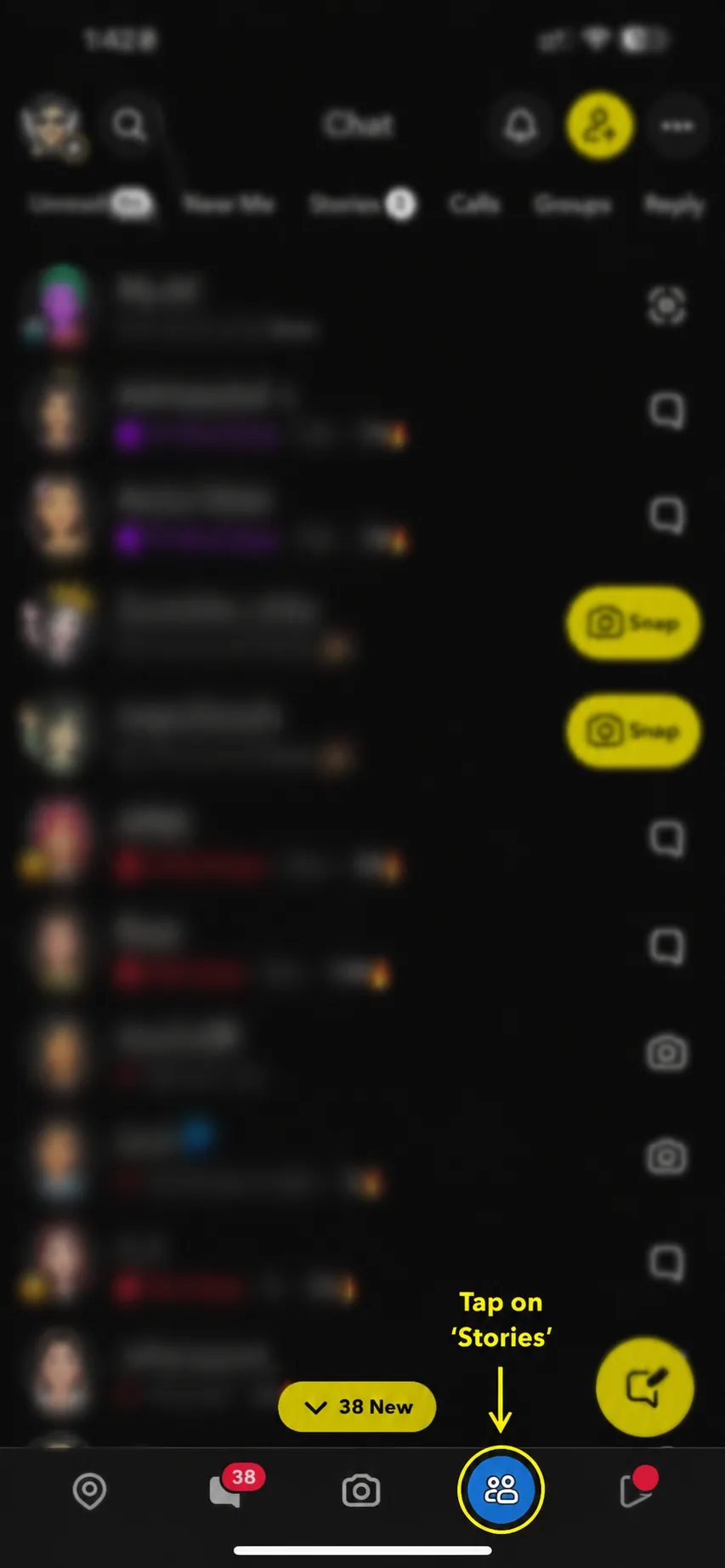
Step 1: Open Snapchat and Go to Stories
Open the Snapchat app on your phone.
Use the navigation bar at the bottom of the screen. Tap the Stories icon, which looks like two people.
Snapchat opens the Stories page.
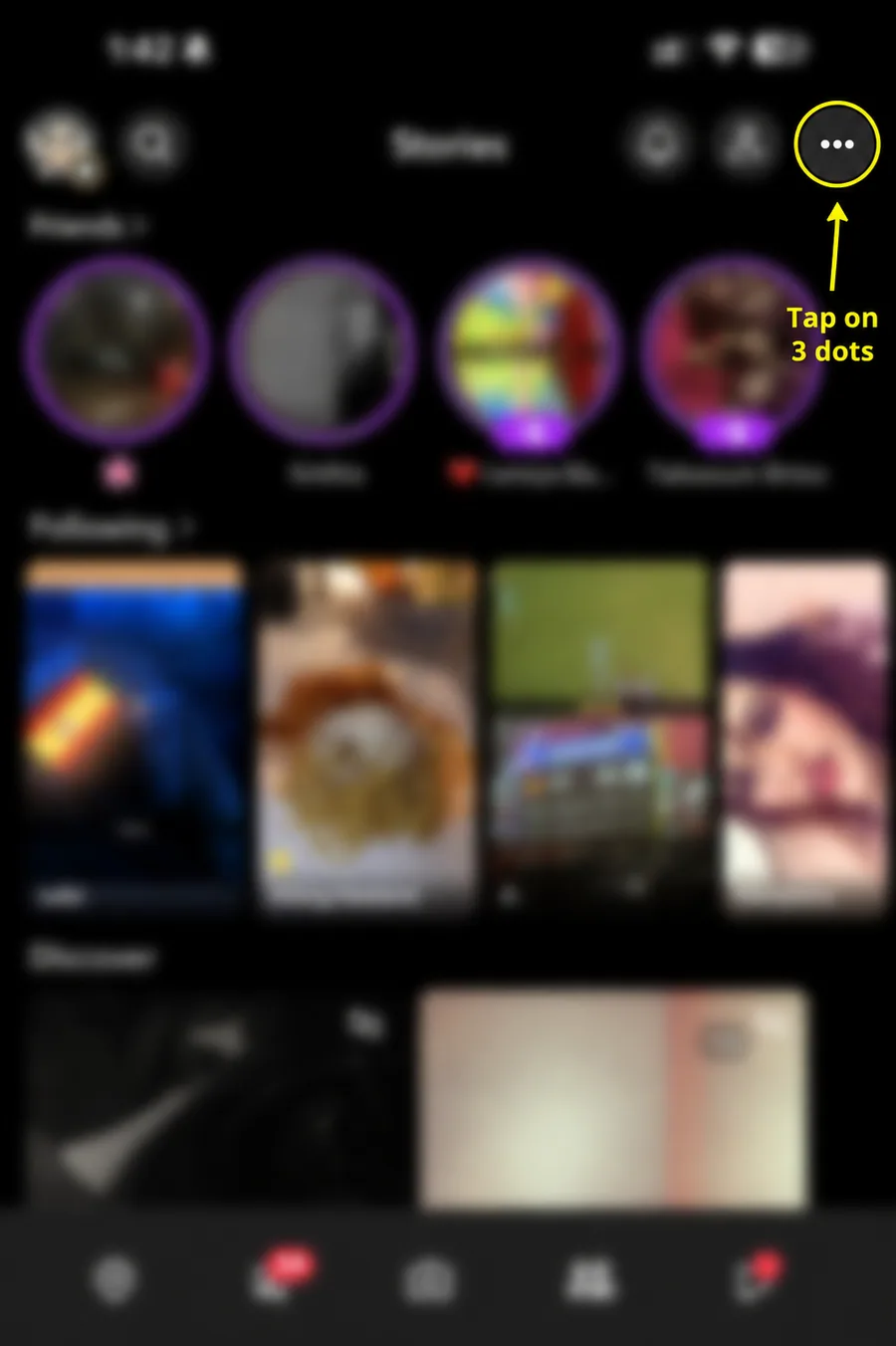
Step 2: Tap the Three-Dot Menu
Use the top-right corner of the Stories page.
Tap the three-dot icon to open the Stories options.
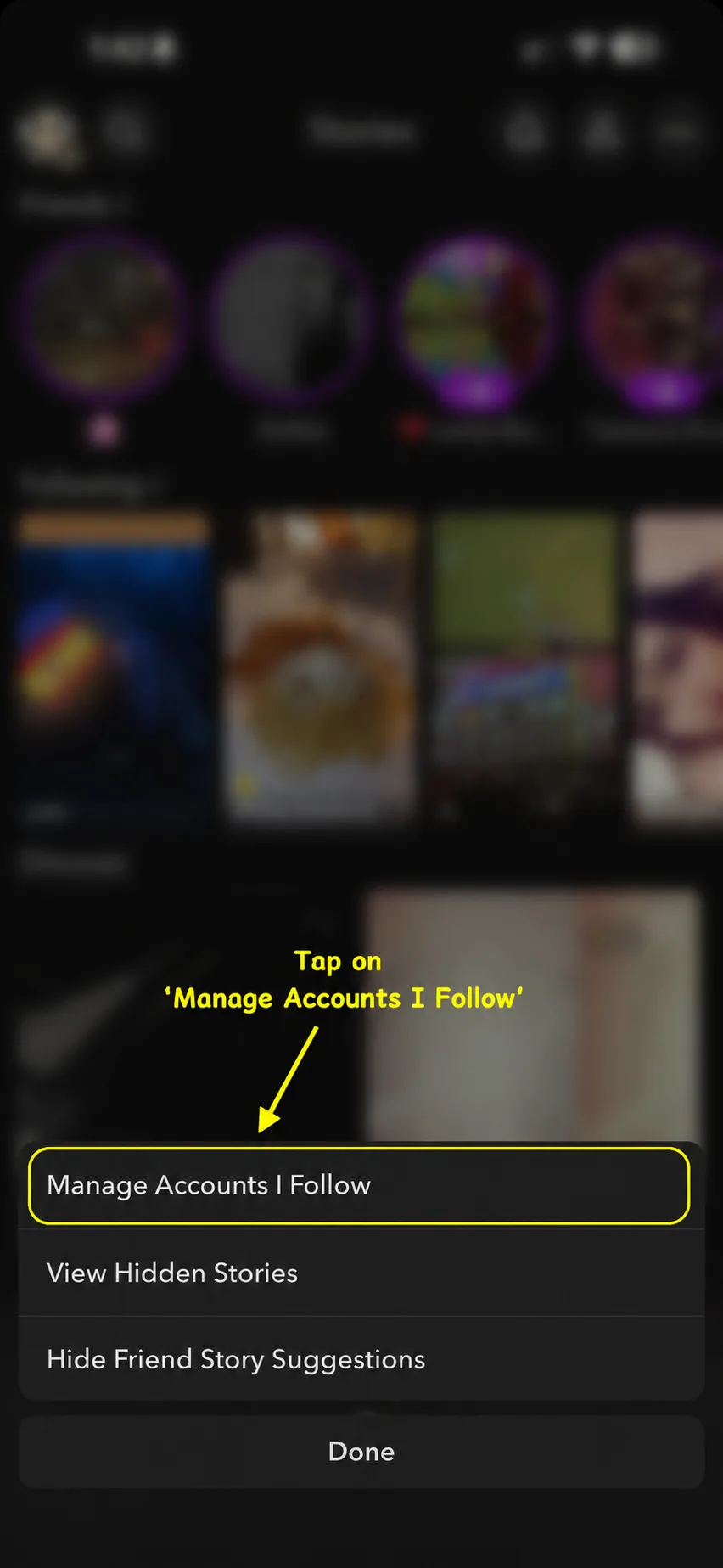
Step 3: Open the Followed Accounts List
A small menu will appear at the bottom of the screen.
Tap Manage Accounts I Follow.
This page lists the profiles whose Stories you currently follow. It also includes one-way connections from old requests.
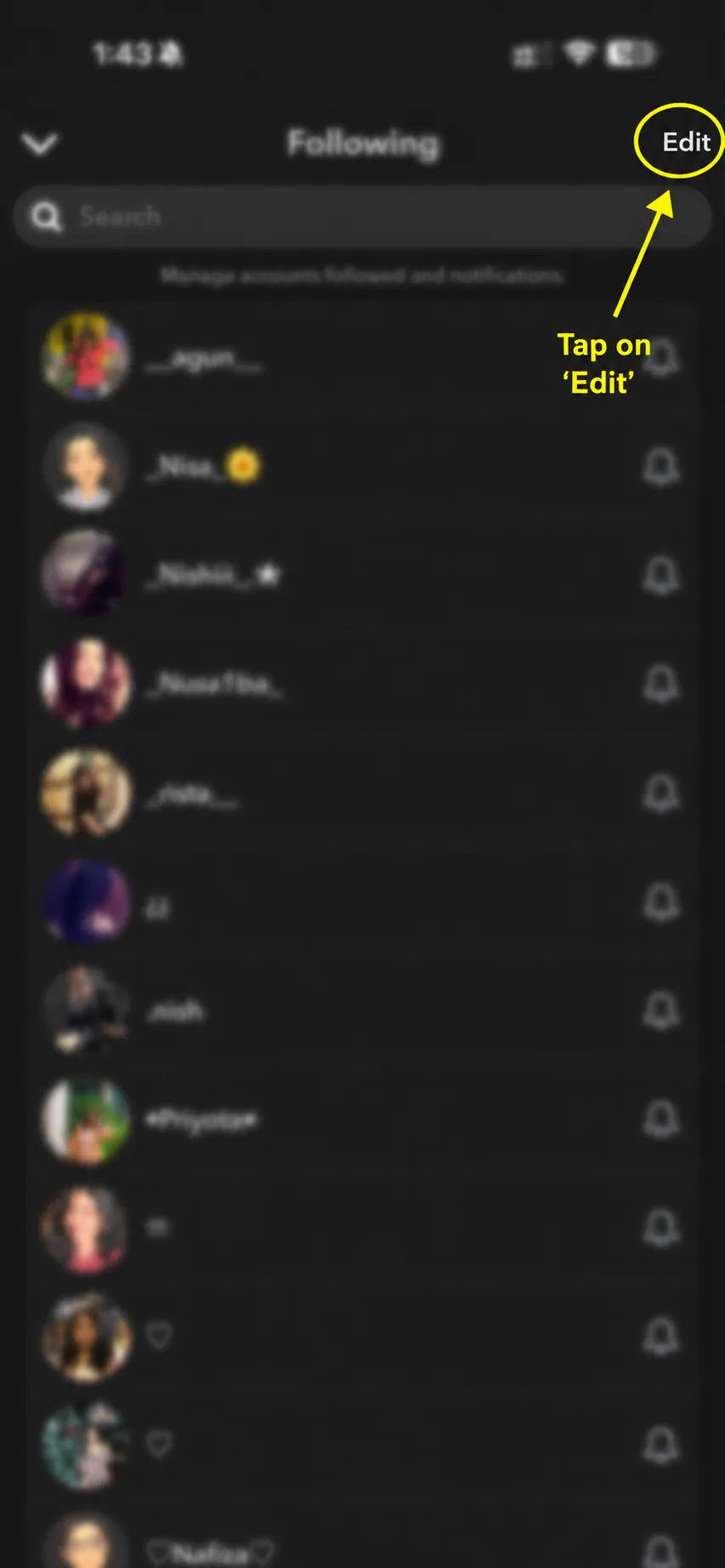
Step 4: Tap Edit
You will now see your Following list.
Tap Edit in the top-right corner. Snapchat places a cross or X icon beside each account.
Use this option when you want to remove followed profiles from one screen.
Step 5: Tap the Cross and Confirm Unsubscribe
Find the account you no longer want to follow.
Tap the X beside that account. Snapchat asks you to confirm the action.
Tap Unsubscribe or Yes, depending on the option shown in your app.
Snapchat removes the account from your Following list.
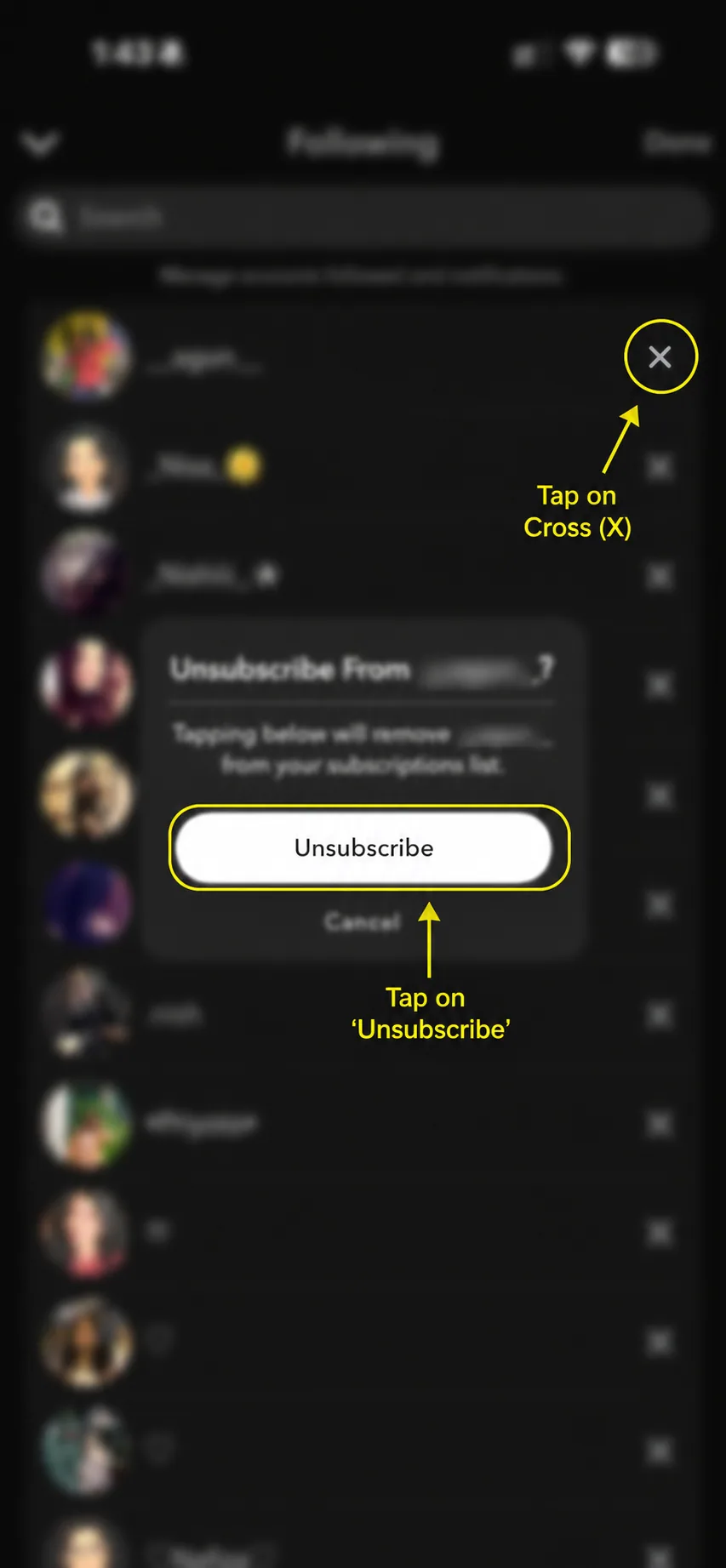
You have now unfollowed the account.
Does Unfollowing Cancel a Pending Friend Request?
Yes, when the account is in your Following list because you added them and they never added you back.
Removing that one-way follow clears the pending connection from your side.
This mainly applies when:
- You added the person first.
- They did not add you back.
- Their profile is in your followed accounts list.
- You remove the profile from that list.
Snapchat defines following as a one-way relationship. When both people add each other, it becomes a two-way friendship.
Unfollowing helps clean up old requests that the other person never accepted.
What Happens After You Unfollow Someone?
After you unsubscribe from an account:
- The account disappears from your Following list.
- Their followed Stories leave your feed.
- Your pending one-way connection clears.
- Snapchat does not block the account.
- You can follow or add the account again later.
Snapchat also offers another method for unfollowing a Story. Press and hold the Story, then tap Added. The list method works better when you want to review old accounts in one place.
Will Someone Know That You Unfollowed Them?
Snapchat does not normally send a direct notification telling someone that you unfollowed their Stories.
However, the person may notice later if they check their followers or see that your pending connection is no longer there.
Snapchat does not send a message such as:
"This person unfollowed you."
For most users, the process remains private and quiet.
Can You Follow the Account Again?
Yes. Unfollowing is not permanent.
To follow on Snapchat again, search for the person's username and open their profile. If they accept your request, you can become friends on Snapchat.
You can also press and hold a Story and use the available follow option in Stories or Discover.
Can You Unfollow Multiple Accounts?
You can review several profiles from the followed accounts page, but Snapchat usually asks you to remove each profile one at a time.
This slower process helps prevent accidental removals.
Why Profile Category Matters
The exact button can change by profile category and app version.
Here, account type means a Snapchat profile category, not a checking account or bank accounts. Public profiles, one-way follows, and mutual friends may use different labels.
Why Can't I Find the Followed Accounts Option?
The option may not appear for several reasons.
Update Snapchat
Open the App Store or Google Play Store and install the latest version. A recent Snapchat update may move the menu.
Open the Correct Stories Page
Make sure you are on the main Stories page before tapping the three-dot icon.
Check Whether You Follow Any Accounts
The section may be empty when you do not currently follow any public accounts or pending connections.
Restart the App
Close Snapchat completely and open it again. This may fix temporary interface problems.
Try the Story Method
When you can see the account's Story, press and hold it and tap Added to unfollow it directly.
Final Thoughts
Old Snapchat follows can hide in your list for months or years. Many come from requests that never became mutual friendships.
Use the Stories page, open the followed accounts list, tap Edit, and remove the profiles you no longer want.
This keeps your account cleaner and reduces old one-way pending requests. You can always add the person again later.
Frequently Asked Questions
Q - How do I find followed accounts?
Open the Stories page, tap the three dots in the top-right corner, and choose the followed accounts list. The page lists profiles you currently follow.
Q - Can I unfollow several accounts at once?
You can remove several profiles from the list, but Snapchat usually asks for a separate confirmation for each one.
Q - Does unfollowing someone block them?
No. Unfollowing only removes the one-way follow. It does not block the person.
Q - Does unfollowing remove an existing Snapchat friend?
Unfollowing a Story subscription and removing a mutual friend are separate actions. Snapchat provides a different Remove Friend option for removing someone from your friends list.
Q - Will unfollowing clear my old pending friend request?
Yes. If the person never added you back, unfollowing clears the one-way pending connection from your side.
Q - Can I undo it?
Yes. Search for the account and follow or add it again.
Q - Why is the button called Unsubscribe?
Snapchat may use words such as Follow, Added, Remove, or Unsubscribe for public Story accounts. The wording can depend on the profile category and app version.